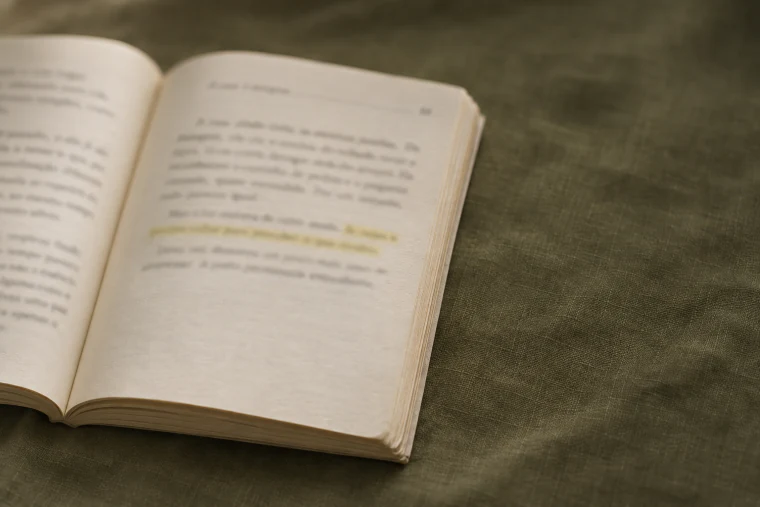
Return to what made you think.

Your personal reading journal

Photograph a page from your book and save the passages you want to remember. Keep your notes together and use those ideas in your own writing.

A private journal. On your phone and computer.

Saved passage

Sometimes you have to go back to see what has changed.
The House by the River p. 88
Cited in a piece of writingWhat Changes When We Go Back

From your book to your next essay.

Your book stays with you. Fogliare keeps its record, your selected passages, and your notes together. Watch a passage become part of your own writing.

  1. Photograph the page

    From Home, swipe right to open the camera.

  2. Review the passage

    Photo capture recognizes Portuguese text. Review it before saving, or type a passage yourself.

  3. Save to your library

    Confirm the book and enter the page. The passage stays linked to the book record.

  4. Write your thoughts

    In Ensaios (Essays), write freely and bring your saved passages into your text.

Real app, with a fictional book and simulated camera input. Steps condensed. Portuguese audio; PT/EN captions.
Written walkthrough and credits
  1. From Home, swipe right to open the camera. Frame the book page and tap to photograph it.
  2. Select the passage and review the text before saving. Confirm the book and enter the page.
  3. The passage stays linked to the book record in your library. Add a note about what it made you think.
  4. In Ensaios (Essays), write freely: connect ideas and follow a question. Type @ to insert a saved passage, then tap its citation to return to the passage, book, and page.

Music: A Kind Of Hope - Scott Buckley · CC BY 4.0 · Excerpt edited and mixed.

One marked passage, three workflows.

Fogliare keeps your books, passages, notes, and writing in one journal. Save a passage with its source, then bring it into your writing. See how each workflow gets you there.

The House by the River p. 88

The house still had the same windows. From the bank, she watched the roof's shadow reach the water, as it had every other afternoon. Sometimes you have to go back to see what has changed. This time, she waited a little longer before crossing.

Book + Google Docs

You organize the references

To save it

Transcribe the passage, add the book and page, and organize the document so you can find it later. Repeat for each passage.

In the document

Sometimes you have to go back to see what has changed.
The House by the River p. 88

To cite it later

Find the file and passage. When using it in another piece of writing, copy the source too and maintain that connection yourself.

Book + AI chat

The passage stays in the chat

To save it

Upload the photo, ask for a transcription, and check the reply against the book. Record the title and page alongside the passage.

Which passages are marked on this page?

In the reviewed reply

Sometimes you have to go back to see what has changed.
The House by the River p. 88

To cite it later

Find the conversation and the right reply. To bring the passage together with your notes and writing, move the content and source into your writing space.

Book + Fogliare

From book to writing, connected

To save it

Photograph, review, and save. The passage stays linked to its book and page, in the same book record where you keep your notes.

In the journalWhat Changes When We Go Back
Sometimes you have to go back to see what has changed.
The House by the River p. 88

To cite it later

Write in Essays and type @ to insert a saved passage. Its citation links to the passage, book, and page. Pick up the idea without rebuilding the reference.

Watch the demo (51 s)

A place to pick up your reading.

The book you are reading, the passage you kept, and the essay it inspired stay connected in your journal.

Join the waitlist
  • Your books, organized.

    Library

    Add a book by title, ISBN, or by hand. Open its record in your library to find your reading history, saved passages, and notes.

  • Pick up where you left off.

    Reading and queue

    Save your current page and arrange what to read next. Each reread gets its own record under the same edition.

  • Keep the thought it sparked.

    Passages and notes

    Photograph or type a passage and check the text. Add a note linked to the book or keep an idea on its own.

  • Your writing, shaped by your reading.

    Essays

    An essay can be a reflection, review, or any piece you write. Bring together ideas from one or several books and cite your saved passages.

  • Return to an earlier reading.

    Archive

    Search finished books, passages, and reflections in your timeline. Filter to find the entry you want to revisit.

  • Take your journal with you.

    Your data

    Export books, passages, notes, and essays as a ZIP containing Markdown and JSON.

Frequently asked questions

How do I photograph a page?

From Home, swipe right to open the camera. Allow camera access and frame the book page, or choose a photo. Select the passage, review the text, and save it with the book and page.

Where does my book go?

Your physical book stays with you. Fogliare stores a record with its title, author, and cover in your library, linked to your passages, notes, and reading history. It does not include the full book text or act as an e-reader.

What is an essay?

It is a piece you write: a reflection, book review, or response to what you read. Connect ideas from several books and insert saved passages as references. It does not have to be academic, and it stays in your private journal.

How do I get access?

Accounts are created by invitation. The waitlist opens soon. Until then, watch the demo. Already have access? Choose Sign in.

Where can I use Fogliare?

Fogliare runs in your browser on phones and computers. You can install it as a web app on supported devices. The journal requires an internet connection.

Can I write in English?

Yes. Type passages, notes, and essays in any language you prefer. This page and the captions are available in Portuguese and English. The app's English interface is being translated.

Who can see what I write?

Each account has its own private journal. Your books, passages, notes, and essays stay in your account.

What happens when I photograph a page?

Standard capture recognizes Portuguese text on your device. Review and edit the result before saving the passage.

Keep going with what you read.

Want to bring your reading into Fogliare? The waitlist for invitation access opens soon.

Registration is not open yet. This page does not collect email addresses.